
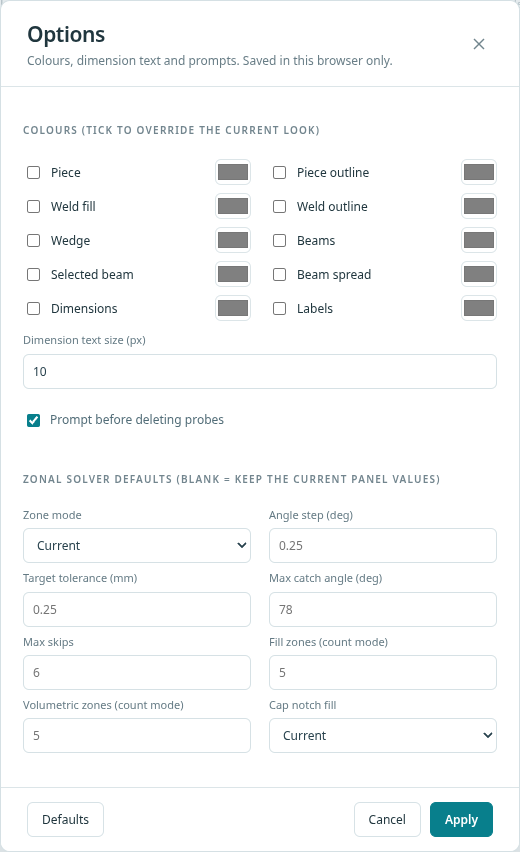
Open Display options on the canvas toolbar, then Options. You can override the colour of the piece, weld, wedge, beams, selected beam, beam spread, dimensions and labels, set the dimension text size, and choose whether deleting a probe asks first. You can also set starting values for the zonal solver (zone mode, angle step, target tolerance, maximum catch angle, maximum skips, zone counts and cap notch fill) and for reports (units, template and caption block). A blank value keeps the current look. Settings are kept in this browser only. Defaults clears every override.
Other topics
- Probe and wedge
- Beamsets
- Part and weld
- Calibration blocks
- Custom parts
- Indications
- Pressure map, delay view and wave animation
- Wedge designer
- Zonal coverage
- Reports
- Files and exports
- Workspace files
- Results pane
- Focal laws
- Focus types
- Near field
- Beam spread
- Weld editor
- Zone naming
- Pipes and curved parts
- Calibration templates
- Drawing editor basics
- Snaps
- Layers
- Trim and extend
- Part templates
- Quality maps
- Full-matrix capture and A-scans
- Time-of-flight diffraction
- High-temperature wedges
- Drawing export
- Probe, wedge and transducer files
- View controls
- Options
- Units
- Report templates
- Layout editor
- Word export
- Accounts and access
- Keyboard shortcuts
- Transducer fields
- Indication types
- Warnings
- Technician guide: from part to plan